
If you already know the TrimUI Brick, then the TrimUI Smart Pro S is easy to understand at a surface level. It is the larger, more powerful, more feature-rich option in the same ecosystem. But that simple explanation is not enough for a serious buyer.
The real question is not whether the TrimUI Smart Pro S Upgrade has a bigger screen or a stronger chip. Of course it does. The real question is whether those upgrades change the ownership experience enough to justify choosing it over the TrimUI Brick, especially for buyers who care about portability, simplicity, and day-to-day use.
That is where this comparison becomes interesting.
The TrimUI Brick and the TrimUI Smart Pro S are not just two differently sized handhelds. They represent two different product philosophies. The Brick is a compact retro-first handheld built around portability, simplicity, and low-friction daily use. The Smart Pro S is built around a broader, more immersive Linux handheld experience, with a larger screen, stronger hardware, a larger battery, and better suitability for systems that benefit from more visual space.
For some users, that makes the Smart Pro S an obvious upgrade. For others, it makes it a different category of device entirely.
Internal link suggestion here: link the first mention of TrimUI Brick to your Brick product page, and the first mention of TrimUI Smart Pro S to your Smart Pro S product page.
Caption: What actually changes when you move from the TrimUI Brick to the TrimUI Smart Pro S? This review focuses on the upgrades that matter in real-world use.
In this review, the goal is not to repeat a spec sheet. The goal is to answer a more useful question:
Is the TrimUI Smart Pro S simply larger, or is it meaningfully better for the right kind of player?
The answer is that it is meaningfully better — but only when the upgrades align with how you actually play.
Quick Verdict
Before getting into the technical breakdown, here is the short version:
- Buy the TrimUI Brick if you want a retro handheld that is easy to carry, easy to use in short sessions, and easy to integrate into daily life.
- Buy the TrimUI Smart Pro S if you want a larger, more immersive Linux handheld with better room for PSP, stronger hardware potential, more battery, and a more substantial gaming experience.
- Upgrade from Brick to Smart Pro S only if screen size, longer-session comfort, and broader performance headroom matter more to you than compact carry convenience.
That is the most honest summary.
At-a-Glance Comparison
| Category | TrimUI Brick | TrimUI Smart Pro S |
|---|---|---|
| Core identity | Compact daily-carry retro handheld | Larger-screen Linux gaming handheld |
| Best use case | Travel, commute, quick sessions | Longer sessions, couch play, bigger-screen systems |
| Screen philosophy | Small and efficient | Large and immersive |
| Battery philosophy | Enough for daily use | Built for longer play |
| Ownership style | Carry-first | Play-first |
| Upgrade value | More portable | More expansive |
This table matters because it frames the decision correctly. Too many comparison posts reduce the choice to “bigger equals better.” That is not how handhelds actually work.
A bigger device is only better if it makes your real use case better.
What the Smart Pro S is actually upgrading
The Smart Pro S does not feel like a trivial revision. It introduces upgrades that change both performance expectations and the physical character of the device.
The most visible changes are:
- a larger 4.96-inch display,
- a stronger Allwinner A523 platform,
- a bigger 5000mAh battery,
- a wider horizontal form factor,
- and usability changes like a dedicated Home button.
These changes matter because they affect more than specs. They affect how often you play, what systems feel comfortable, and whether the device behaves like a portable companion or a primary handheld.
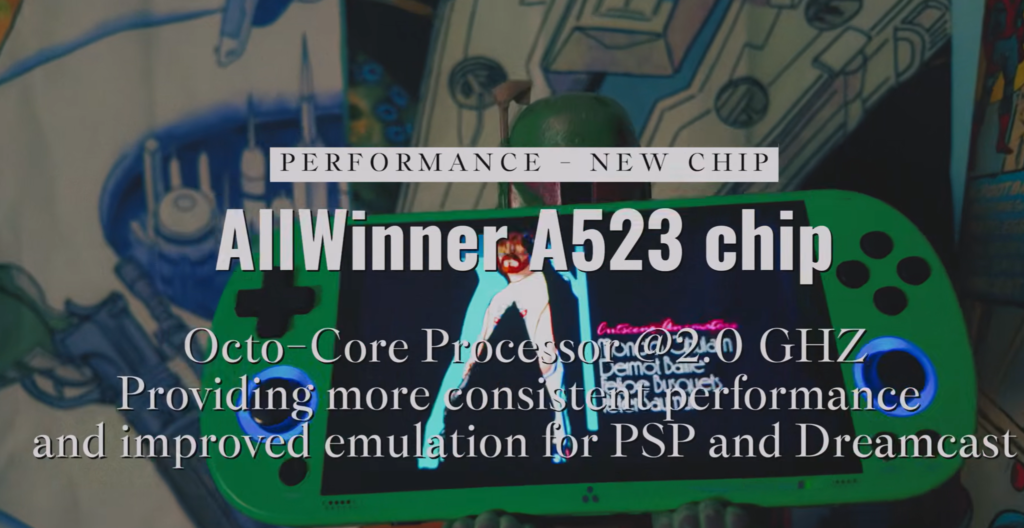
Caption: The Smart Pro S moves to the Allwinner A523, giving it a more capable hardware base than smaller carry-first handhelds.
Why the A523 matters
The chip upgrade is one of the clearest signals that the Smart Pro S is not meant to be a minor cosmetic step. A newer and more capable processor affects consistency, broader emulator coverage, and the sense that this device is designed to do more than just cover the basic retro workload.
That does not mean the Smart Pro S suddenly becomes a high-end emulation monster. It does mean the hardware feels more appropriate for buyers who want a device that stretches further than a compact classic-oriented handheld.
Why the battery matters
The jump to 5000mAh matters for the same reason. A larger screen naturally invites longer play sessions. Once a device becomes more visually comfortable, you are less likely to treat it as a “quick break machine” and more likely to settle into it. The battery capacity helps the product support that role rather than fight against it.
Why the Home button matters
Small usability changes often matter more than spec changes in daily ownership. A dedicated Home button sounds minor, but it improves navigation speed, menu access, and overall convenience. Devices often become frustrating not because of raw hardware limitations, but because they feel one step slower than they should in repeated use.
Caption: The dedicated Home button improves navigation speed and makes the Smart Pro S feel more convenient in daily use.
That is one of the hidden strengths of the Smart Pro S upgrade story: it is not only about bigger numbers. It is also about making the device feel more complete.
Screen size changes the product more than the processor does
For most real buyers, the single most meaningful upgrade is not the chip. It is the screen.
This is where the Smart Pro S becomes a genuinely different handheld rather than just a better-spec Brick alternative.
The TrimUI Brick is attractive because it is compact and visually disciplined. Its screen is part of a tightly focused carry-first design. The display is there to serve convenience, quick access, and a smaller device footprint.
The Smart Pro S takes the opposite path. Its larger 4.96-inch display transforms the way the device is perceived:
- menus look more spacious,
- interface elements breathe more,
- gameplay feels less cramped,
- and systems that benefit from more screen area immediately become more appealing.
This is especially important for PSP and other content that feels compromised on smaller displays. A larger screen does not just make the picture bigger. It changes which systems feel worth launching in the first place.
Caption: Games that benefit from screen space immediately feel better on the Smart Pro S, especially compared with smaller handhelds built around portability first.
Screen comparison logic
| Question | Brick answer | Smart Pro S answer |
|---|---|---|
| Does it feel easy to carry? | Yes | Less so |
| Does it feel easy to see? | Good enough | Clearly better |
| Does it encourage quick play? | Yes | Yes, but less naturally |
| Does it encourage longer play? | Less strongly | Much more strongly |
| Does the screen change what games feel enjoyable? | A little | A lot |
That table captures something important: screen size is not just a comfort upgrade. It changes the behavior of the device.
Design and physical layout: this is where the Smart Pro S starts feeling like a “main handheld”
The Smart Pro S is wider, more substantial, and more console-like in the hand. That alone changes how users interpret it.
The Brick feels like something you can keep with you almost accidentally. The Smart Pro S feels like something you intentionally bring because you expect to spend time with it.
That shift is visible not only in the body shape, but in the overall control layout, port arrangement, and interface structure.
Caption: The Smart Pro S includes a wider layout, dual shoulder buttons, analog sticks, USB/OTG, reset access, TF card support, and a 3.5mm jack.
Physical layout advantages
The wider horizontal design creates space for:
- dual analog sticks,
- more settled grip positioning,
- better visual symmetry,
- and more obvious “main device” energy.
This is particularly relevant for players who find vertical compact devices charming but limiting over time. Small vertical handhelds are often appealing at first because they are cute and highly portable. But once users start asking for better screen comfort, more room for hands, and better visibility, they are often asking for a different device class.
The Smart Pro S is that different class.
But larger does not mean universally better
A larger body can improve comfort in some ways and reduce it in others. Bigger handhelds ask for more bag space, more intentional carry, and more commitment. They are more visible as objects. They are less “always nearby.”
That is why the Smart Pro S should not be described as the Brick’s simple replacement. It is better described as a step up into a different use pattern.
Software and interface: the larger display also improves perceived software quality
One of the underappreciated effects of a larger screen is that it often makes the software feel better, even before the software itself changes.
On smaller handhelds, menus can feel dense. Icons compete for space. UI elements are more functional than comfortable. That is acceptable when the product’s main job is portability.
On the Smart Pro S, the larger screen makes the interface feel more relaxed and more modern.
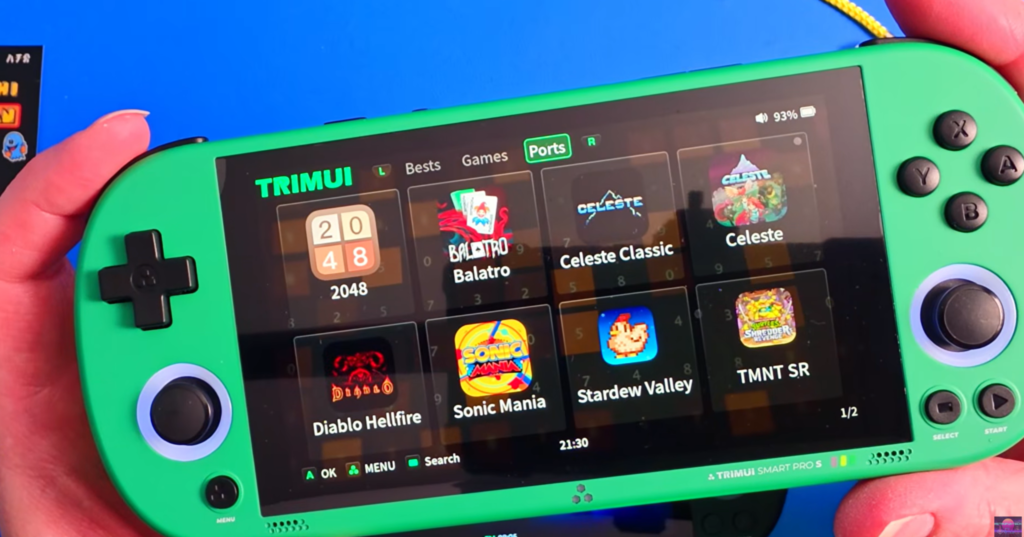
Caption: The Smart Pro S interface looks clean and readable on the larger display, especially for users who want a more spacious frontend.
The home screen and ports view illustrate that clearly. The device has enough display room for interface clarity to become part of the experience rather than merely a requirement.
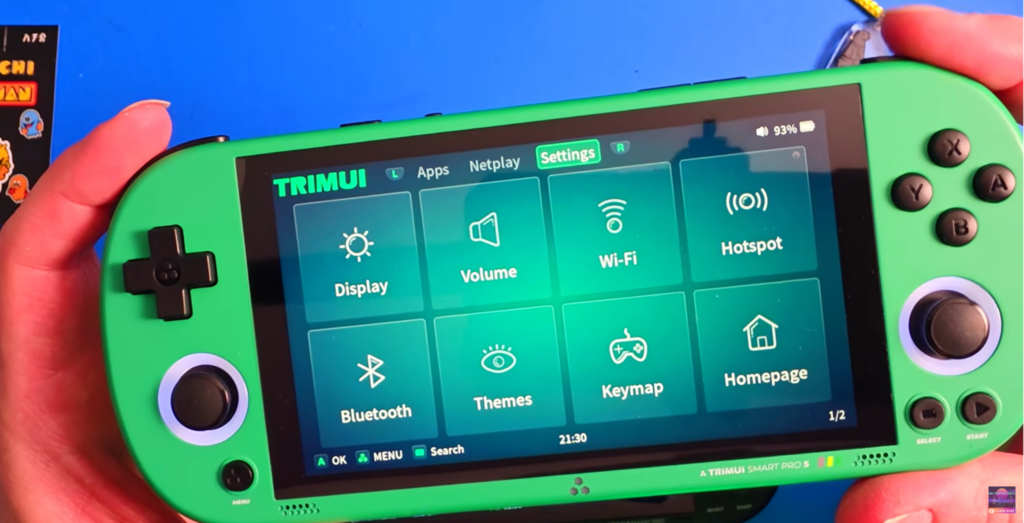
Caption: Quick access to display, audio, Wi-Fi, Bluetooth, themes, and key mapping helps make the Smart Pro S feel more flexible than a minimalist carry device.
The settings screen is especially useful because it visually supports several claims at once:
- the larger display makes menus easier to browse,
- the software feels flexible,
- the device is not positioned as minimal-only,
- and features like Wi-Fi, Bluetooth, themes, and key mapping reinforce the sense that the Smart Pro S is meant to be configured and used as a fuller gaming machine.
This is an important distinction from the Brick. The Brick is attractive partly because it feels simpler. The Smart Pro S is attractive because it feels broader.
Internal link suggestion here: link to your TrimUI Brick setup guide in the paragraph about ease of setup and daily use.
Thermal management and sustained use
This is another upgrade area that matters more than it first appears.
A device that aims at larger-screen gaming and longer sessions has to justify itself thermally. Otherwise the bigger body and stronger chip become less convincing in practice.

Caption: Active cooling is one of the practical upgrades that helps the Smart Pro S sustain longer gaming sessions.
The active cooling note is valuable not because every reader is a thermal engineering enthusiast, but because it supports a broader product conclusion:
The Smart Pro S is designed to behave like a device you stay with longer.
That makes the thermal design part of the ownership story, not just a bullet point.
Real-world performance: the upgrade matters most when screen and chip work together
The Smart Pro S is interesting not simply because it has a newer chip, but because that chip is paired with a much larger display and a larger battery. Those three upgrades reinforce each other:
- the larger display makes more demanding platforms worth playing,
- the stronger chip helps those platforms feel more viable,
- and the larger battery supports longer sessions so the bigger body makes sense in practice.
That is what separates a meaningful upgrade from a cosmetic one.
Performance should be judged by practical workload, not marketing language
A smart buyer does not ask, “What is the strongest thing it can boot?”
A smart buyer asks, “What kind of library feels comfortable and natural on this machine?”
That is where the Smart Pro S becomes easier to justify.
Practical system fit comparison
| Platform category | TrimUI Brick | TrimUI Smart Pro S | What actually matters |
|---|---|---|---|
| 8-bit / 16-bit classics | Excellent fit | Excellent fit | Both handle these comfortably; the difference is mostly screen feel and body size |
| GBA / SNES / Genesis | Very strong use case | Very strong use case | Brick is more portable, Smart Pro S gives a more relaxed viewing experience |
| PS1 | Strong fit | Stronger overall experience | Smart Pro S gives more screen comfort and more “sit down and play” value |
| PSP | Limited by screen concept more than by pure identity | One of the strongest reasons to buy it | Larger 4.96-inch screen changes whether PSP feels worth launching regularly |
| Dreamcast / N64 class | Not the reason to buy it | More plausible reason to buy it | Smart Pro S benefits from broader hardware ambition and a bigger display |
| Ports / modern-style interface-heavy use | Possible, but less natural | Clearly more attractive | The larger display and wider layout make menu-heavy content feel less cramped |
This table captures the most important reality: the Smart Pro S does not just give you “more performance.” It gives you a broader comfort envelope.
The biggest Smart Pro S advantage is not benchmark power — it is reduced compromise
A useful way to think about retro handhelds is to ask:
Where does each device force compromise?
The Brick compromises mainly in:
- screen space,
- longer-session comfort,
- and the feeling that certain systems deserve more room than the device wants to give them.
The Smart Pro S compromises mainly in:
- size,
- carry convenience,
- and the fact that it no longer behaves like a tiny grab-and-go object.
That is a cleaner way to understand the tradeoff than saying one device is “better.”
Why the larger screen matters more than many people realize
A lot of buyers underestimate how much screen size influences perceived performance.
When a device has a small display, even “good enough” emulation can still feel compromised because:
- text feels tighter,
- menus feel denser,
- widescreen content feels more reduced,
- and games that should feel comfortable end up feeling merely acceptable.
That is what the Smart Pro S is fixing.
Display impact by use pattern
| Use pattern | Brick result | Smart Pro S result |
|---|---|---|
| 10-minute quick session | Excellent | Good |
| 45-minute relaxed session | Good | Excellent |
| UI-heavy browsing | Functional | Comfortable |
| PSP / widescreen play | Less compelling | One of the main reasons to buy it |
| Couch use | Good | Better |
| Pocket-first use | Better | Less suitable |
That is why the Smart Pro S is not merely “bigger.” It is more persuasive for a different style of ownership.
Ports, controls, and physical layout: the Smart Pro S feels more complete, not more minimal
The control diagram is useful because it shows that the Smart Pro S is designed with a fuller hardware identity: dual shoulder buttons, analog sticks, menu and reset access, TF card slot, 3.5mm audio, and a body layout that feels much closer to a “main handheld” than a minimalist retro companion.
Why this matters
The layout changes the psychological position of the device.
The Brick feels like a compact object you happen to game on.
The Smart Pro S feels like a gaming system you are expected to interact with more fully.
That distinction is subtle, but important.
For some buyers, the Smart Pro S layout will feel more serious, more complete, and more future-proof. For others, it will feel like overkill compared with the elegance of a smaller carry-first machine.
Interface maturity: the Smart Pro S makes software feel easier to live with
The larger hardware often makes software feel more mature even when the core software philosophy is similar.
The settings and home screen screenshots show that clearly. The Smart Pro S is not only for launching a ROM and leaving. It is a handheld that invites browsing, system navigation, settings adjustment, and wider use.
Why the software presentation matters
A device can have a capable backend and still feel awkward if the front-end experience feels cramped or overly dense. The Smart Pro S avoids that problem much more naturally than a compact model does.
This is one of the less obvious reasons the Smart Pro S feels more like a “complete device.”
Thermal design and sustained play: the Smart Pro S is built for staying with the session
A bigger screen and stronger hardware only feel justified if the device can also behave properly under longer play. Otherwise, the whole upgrade path starts to feel cosmetic.
The active cooling detail matters because it supports the product’s entire logic:
- the bigger screen encourages longer play,
- the bigger battery supports longer play,
- and active cooling helps the system sustain that role.
For the average buyer, it means:
- better confidence in longer sessions,
- more credible use of the hardware ceiling,
- and a device that feels engineered for more than short-burst casual play.
The Home button upgrade is small but more important than it sounds
A dedicated Home button is exactly the kind of “quiet upgrade” that improves ownership without dominating a spec sheet.
Why does this matter?
Because many handheld annoyances are not caused by weak hardware. They are caused by repeated friction:
- too many inputs to jump back,
- clumsy menu navigation,
- slight delays in getting where you want,
- and the feeling that the device is always one step less convenient than it should be.
The Home button reduces that friction. That makes it one of the best examples of thoughtful refinement in the Smart Pro S.
Upgrade decision matrix: should Brick owners move to the Smart Pro S?
This is probably the most useful section for real buyers.
| If this sounds like you… | Recommendation |
|---|---|
| “I love the Brick because I can always bring it with me.” | Stay with the Brick |
| “I keep wishing the screen were bigger.” | Upgrade to Smart Pro S |
| “I mostly play quick retro sessions during the day.” | Stay with the Brick |
| “I want a handheld that feels more like a main gaming device.” | Upgrade to Smart Pro S |
| “I care about PSP and wider-screen content.” | Upgrade to Smart Pro S |
| “I care more about portability than immersion.” | Stay with the Brick |
| “I want more battery and longer relaxed sessions.” | Upgrade to Smart Pro S |
| “I want the simplest lifestyle fit.” | Stay with the Brick |
Short version
You should move from Brick to Smart Pro S when the Brick’s limitations have become visible to you in regular use.
If they have not, then the Smart Pro S may be attractive but unnecessary.
Buyer profiles: who each handheld is actually for
Buyer 1: the commute gamer
This buyer wants:
- a handheld that fits into real life,
- something easy to carry,
- something that makes idle moments usable.
Best fit: TrimUI Brick
Buyer 2: the immersion-first retro player
This buyer wants:
- more screen,
- less visual compromise,
- more comfort for longer sessions,
- more room for PSP and other systems that feel cramped on small handhelds.
Best fit: TrimUI Smart Pro S
Buyer 3: the minimalist
This buyer likes:
- compact design,
- fewer compromises in carry convenience,
- lower-friction ownership.
Best fit: TrimUI Brick
Buyer 4: the “one device to do more” buyer
This buyer wants:
- broader performance ceiling,
- larger interface space,
- more battery,
- more “main handheld” feeling.
Best fit: TrimUI Smart Pro S
Buyer 5: the portable collector
This buyer wants the device to be:
- easy to admire,
- easy to keep nearby,
- and easy to use casually.
Best fit: TrimUI Brick
Buyer 6: the couch-and-desk user
This buyer wants:
- a more settled playing posture,
- bigger-screen comfort,
- and a device that rewards intentional gaming time.
Best fit: TrimUI Smart Pro S
TrimUI Smart Pro S Upgrades Pros and Cons
TrimUI Smart Pro S — Pros
- Much larger and more immersive display
- More suitable for PSP and visually demanding retro systems
- Stronger hardware platform for a broader Linux handheld role
- 5000mAh battery supports longer sessions
- More complete-feeling layout and broader software interface experience
- Active cooling reinforces its session-oriented design
- Dedicated Home button improves usability
TrimUI Smart Pro S — Cons
- Less portable in everyday life than the Brick
- Less pocket-friendly and less naturally “always nearby”
- More device than some casual retro buyers actually need
- Larger footprint changes the low-friction charm that makes compact handhelds special
TrimUI Brick — Pros
- Better carry convenience
- Easier to integrate into daily life
- Stronger fit for short-burst retro gaming
- Simpler, cleaner product concept
- Easier to justify as an everyday companion
TrimUI Brick — Cons
- Screen size becomes a real limitation for some systems
- Less convincing as a main handheld for longer sessions
- More likely to make users eventually wish for more display room
- Broader hardware ambition is not the point of the product
Final verdict
So, are the Smart Pro S upgrades actually worth it over the TrimUI Brick?
Yes — but only for the right buyer.
If you judge value by:
- screen size,
- session comfort,
- broader hardware ambition,
- battery headroom,
- and a more substantial Linux gaming experience,
then the TrimUI Smart Pro S is clearly worth it.
If you judge value by:
- portability,
- simplicity,
- routine-friendly use,
- and how often the handheld naturally stays with you,
then the TrimUI Brick still makes more sense.
The cleanest expert takeaway
The Brick is the better everyday retro handheld.
The Smart Pro S is the better larger-screen retro handheld.
The Smart Pro S is not just “bigger.” It is better when your priorities move beyond portability and toward a fuller gaming experience.
The Brick is not “outdated” by comparison. It is simply more disciplined in what it is trying to do.
That is why the Smart Pro S is an upgrade for some users and a side-grade for others.
Expert Recommendation Box
Choose the TrimUI Brick if you want a handheld that is compact, low-friction, easy to carry, and ideal for quick retro gaming sessions throughout the day.
Choose the TrimUI Smart Pro S if you want a bigger-screen Linux handheld with more room for PSP, longer sessions, more battery, and a stronger “main device” feel.
Upgrade from Brick to Smart Pro S only if you already feel the limits of small-screen gaming in your real use.
KKK
Is the TrimUI Smart Pro S better than the TrimUI Brick?
Not universally. It is better for larger-screen gaming, longer sessions, and broader hardware ambition. The Brick is still better for portability and everyday carry. Learn More.
Is the Smart Pro S worth upgrading to from the Brick?
Yes, if you want more display room, more battery, and a more substantial gaming experience. No, if the Brick already fits your daily routine perfectly.
Is the Smart Pro S better for PSP?
Yes. The larger display is one of the biggest reasons to choose it.
Is the Brick still worth buying?
Absolutely. It remains the stronger choice for buyers who want a compact handheld they will actually carry and use often.
Which one should most people buy?
If convenience matters most, buy the Brick. If immersion matters most, buy the Smart Pro S.